Trimble has several tax entities around the world including in the United States, Canada, United Kingdom, France, Germany, Finland, Australia, and the Netherlands. When making your purchase online, the purchase will be fulfilled by a local Trimble entity where available. If no Trimble entity is available in your country, your purchase will go through our Netherlands store (Trimble Europe B.V.) in Europe or our US store (Trimble Inc.) elsewhere.
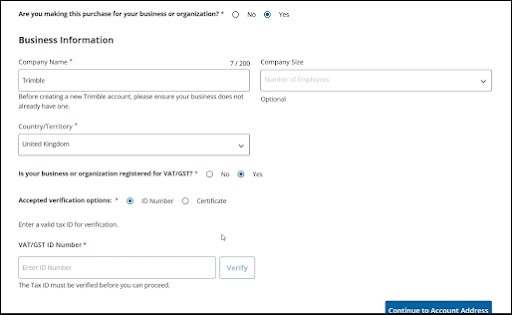
When you checkout for the first time, you will be prompted to complete your business profile prior to placing your order. During this process, you have the opportunity to add tax information to your account.
For tax exempt businesses or organizations, you can add VAT tax information under Business Information.
If you need to update your tax information, or have already made a purchase and need to add tax exempt status, you can request an update to your account through Trimble support by following these steps:
- Obtain a PDF copy of your tax exemption certificate, or locate your VAT ID number.
- Compose an email to trimble-support@trimble.com with the subject line “Tax Exemption Request.”
- Include the following information in the body of your email:
- The email address associated with your order
- The order number
- The customer name on the order
- The company name
- Attach the PDF copy of your tax exemption certificate, or include your full VAT ID number.
- Support will send a follow-up email after they receive your request.
SketchUp’s refund policies still apply to requests for VAT and tax refunds. The customer is responsible for claiming any eligible tax charged on their tax filings.