SketchUp AI features cost a set number of SketchUp AI Credits:
- AI Render costs 5 credits.
- Generate Object costs 30 credits.
- AI Help costs 0 credits.
These credits represent the cost of the computational power each tool uses. Each SketchUp subscription tier includes a set number of credits you can use each month:
- Free – No credits included for free users
- Go – 100 credits per month
- Pro – 150 credits per month
- Studio – 200 credits per month
The credits included in your subscription resets monthly on your renewal date.
If you end up using all your credits, or expect to use more credits than what’s included with your subscription, a SketchUp AI subscription may be right for you. The SketchUp AI subscription is a monthly add-on that gives you 1500 additional credits per month.
When you run out of credits, SketchUp will ask if you want to add SketchUp’s AI Subscription. If you want to purchase it before you run out of credits, follow these steps:
- Make sure that you have the latest version of SketchUp installed.
Open SketchUp AI (
 ).
).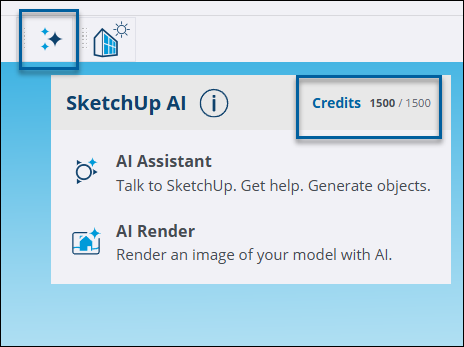
- Click Credits.
Click Increase Balance. Trimble’s shop will open in your web browser.

- Complete the order form in the shop. The SketchUp AI Subscription will be added to your account.